Starting an Android app can feel overwhelming because requirements come from several directions at once: the computer you need, the software you install, the skills involved, the rules of Google Play and the business planning behind the idea. The purpose of this guide is to explain Android app development requirements in a clear, organised way, so founders, managers and new developers in the UAE know exactly what is needed before the first line of code is written. You will see what the process looks like from idea to launch, and which decisions matter most.
Hardware and System Requirements
Android development is demanding on a computer, mostly because of the emulator and the build tools. You can develop on Windows, macOS or Linux, and Google publishes the official minimum specifications on the Android Studio page. At the time of writing, Google lists 8 GB of RAM as a minimum and recommends more, and in practice 16 GB makes a big difference when you run an emulator, a browser and a design tool together. A modern multi-core processor and a solid-state drive also speed up builds noticeably, since each build compiles a large amount of code.
Beyond the computer, you should test on real phones. An emulator is useful, but it cannot fully reproduce battery behaviour, camera quality, network changes or the performance of low-cost handsets. Android runs on a huge range of screen sizes and hardware, so testing on at least a few devices, including one older or budget model, gives a more honest picture of how your app behaves for everyday users.
Software, Tools and Programming Languages
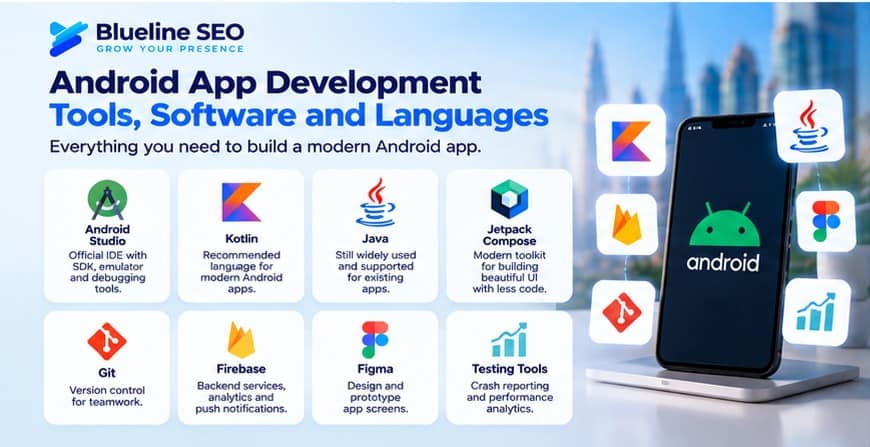
The central tool is Android Studio, Google’s official development environment. It includes the code editor, the Android SDK, an emulator, debugging tools and performance profilers. Installing it gives you most of what you need to start.
For the programming language, Google recommends Kotlin for Android, and most new apps are written in it. Kotlin is concise, safer than older approaches and well supported by Google’s libraries. Java is still used in many existing apps and remains valid, which matters if you are maintaining older code. Modern interfaces are commonly built with Jetpack Compose, Google’s toolkit for creating screens with less code than traditional layouts.
Most real projects need supporting tools as well. Git handles version control so a team can work together and roll back mistakes. Firebase or a custom backend manages login, databases, push notifications and analytics. Design tools such as Figma help plan screens before development. Crash reporting and analytics tools tell you what happens after launch. If you cross-compare approaches, it is also worth knowing that cross-platform frameworks exist for building iOS and Android together, and the right choice depends on your budget, performance needs and long-term plans.
Skills and Team Requirements
A working app is rarely a one-person job once it grows beyond a simple tool. A typical team includes a product owner or business analyst who defines what the app should do, a UI/UX designer who shapes the screens and flows, one or more Android developers, a backend developer if the app needs a server, and a tester or quality assurance specialist. Someone also has to manage the project and keep the schedule realistic.
On the technical side, an Android developer needs solid knowledge of Kotlin or Java, app architecture patterns, working with APIs, local data storage, handling different screen sizes, and basic security practices. Skills in testing and debugging are just as valuable, because most project time goes into making things reliable rather than writing the first version. If you do not have this team in-house, working with a specialist company is a common solution. You can explore professional mobile application development services, including mobile app development in Dubai and in Abu Dhabi. To compare development companies, independent profiles and verified client reviews on platforms such as Clutch and DesignRush can help you build a shortlist.
The Android App Development Process
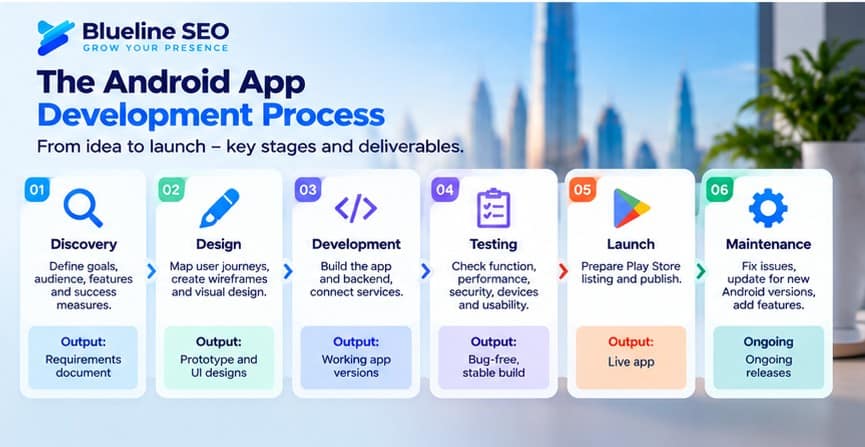
Understanding the process helps you plan time and budget. It usually runs in stages, and skipping early ones tends to cost more later.
| Stage | What Happens | Main Output |
|---|---|---|
| Discovery | Define goals, audience, features, and success measures | Requirements document |
| Design | Map user journeys, create wireframes, and develop visual designs | Prototype and UI designs |
| Development | Build the app and backend, and connect services | Working app versions |
| Testing | Check functionality, performance, security, device compatibility, and usability | Stable, thoroughly tested build |
| Launch | Prepare the Google Play Store listing and publish the app | Live app |
| Maintenance | Fix issues, update for new Android versions, and add features | Ongoing releases |
The discovery stage deserves extra attention. Many app projects struggle not because the code is poor, but because the business goal was unclear or too many features were crammed into the first version. A good practice is to launch a focused first release, often called a minimum viable product, and improve it using real user feedback. Startup-focused publications such as Wamda and Entrepreneur Middle East regularly share how regional founders approach early product versions and growth.
Google Play and Publishing Requirements
Publishing on Google Play requires a developer account, which involves a one-time registration fee, and you will manage your app through the Google Play Console. Google also sets technical and policy requirements that change over time. These include targeting a recent Android API level, following its policies on user data and permissions, providing a clear privacy policy, completing data safety information and meeting testing requirements for certain account types. Because these rules are updated regularly, always check the current guidance in the Play Console before planning your launch date.
You also need store assets: an app name, icon, screenshots, a short and full description and, ideally, a promotional video. Writing these with search in mind helps people find your app, which is a form of app store optimisation. The same thinking applies to your website, so it is worth reading our guide on how to rank a new website on Google in the UAE and exploring SEO services to support your app’s discoverability.
UAE-Specific Considerations and Budget Planning
Apps built for the UAE market have a few extra requirements worth planning from the start. Arabic support, including right-to-left layouts, is important if your audience includes Arabic speakers, and it should be built into the design rather than added at the end. Payment options, local phone number formats and address handling should suit how people in the UAE actually use services. Data protection also matters: the UAE has a federal personal data protection law, and apps that collect personal information should be designed with privacy in mind, ideally reviewed by a legal adviser. The UAE Government Portal is the official starting point for information on data protection and digital government programmes.
Budget depends on the number of features, design complexity, backend needs, integrations and how many platforms you cover. Rather than asking for a single price, it is wiser to define a clear scope, request a breakdown by stage and plan for ongoing costs such as hosting, third-party services, updates and support. A launch is a beginning, not an end. You will also need a way to bring users in, whether through a supporting web development project, social media marketing or paid campaigns, as discussed in SEO vs Google Ads in Dubai. To see how projects are delivered, browse some case studies.
Frequently Asked Questions
What do I need to start developing an Android app?
You need a capable computer, Android Studio, knowledge of Kotlin or Java, a test device and a clear plan for what the app should do.
Which language is best for Android development?
Kotlin is Google’s recommended language for new Android apps. Java is still supported and widely used in existing projects.
Do I need a Mac to build Android apps?
No. Android Studio runs on Windows, macOS and Linux.
How long does it take to build an Android app?
It depends on scope. A simple app may take a few weeks, while complex apps with backends and integrations take several months.
What does it take to publish on Google Play?
A developer account, a compliant app, a privacy policy, store listing assets and completion of Google’s policy and data safety requirements.
Should I build a native Android app or a cross-platform app?
Native gives the best performance and platform access, while cross-platform can reduce cost when you need iOS and Android together. The right choice depends on your goals.
Conclusion
Understanding Android app development requirements means looking beyond code. You need suitable hardware, the right tools, a capable team, a structured process, a plan for Google Play and an awareness of local needs such as Arabic support and data privacy. Start with a focused scope, test on real devices and keep improving after launch. To discuss your app idea with a specialist team, contact BlueLine SEO.